
If you are a content creator, marketer, or video editor in 2026, you already know that CapCut has completely revolutionized the editing landscape. It is no longer just a simple mobile app for quick TikToks; it is a full-fledged powerhouse.
However, as the platform has grown, so has its pricing structure. You are likely wondering exactly what the CapCut Cost 2026 looks like.
With multiple tiers, confusing subscription lengths, and new AI features locked behind paywalls, figuring out the right plan can be a headache. We are here to clear that up. In this comprehensive guide, we will break down exactly how much CapCut costs. You will discover the exact differences between the Free, Standard, Pro, and Team plans. Furthermore, we will show you how to bypass the standard retail prices and score massive discounts on genuine licenses.
Let’s dive into the ultimate CapCut pricing breakdown.
What is the CapCut Cost in 2026? A Quick Overview
Before we dive into the microscopic details of every single feature, let’s look at the broad strokes of the CapCut Subscription Price.
ByteDance (the parent company behind CapCut and TikTok) has restructured its offerings to cater to different levels of creators. The CapCut cost now officially falls into four distinct categories:
- CapCut Free: $0 forever. The baseline entry point for beginners.
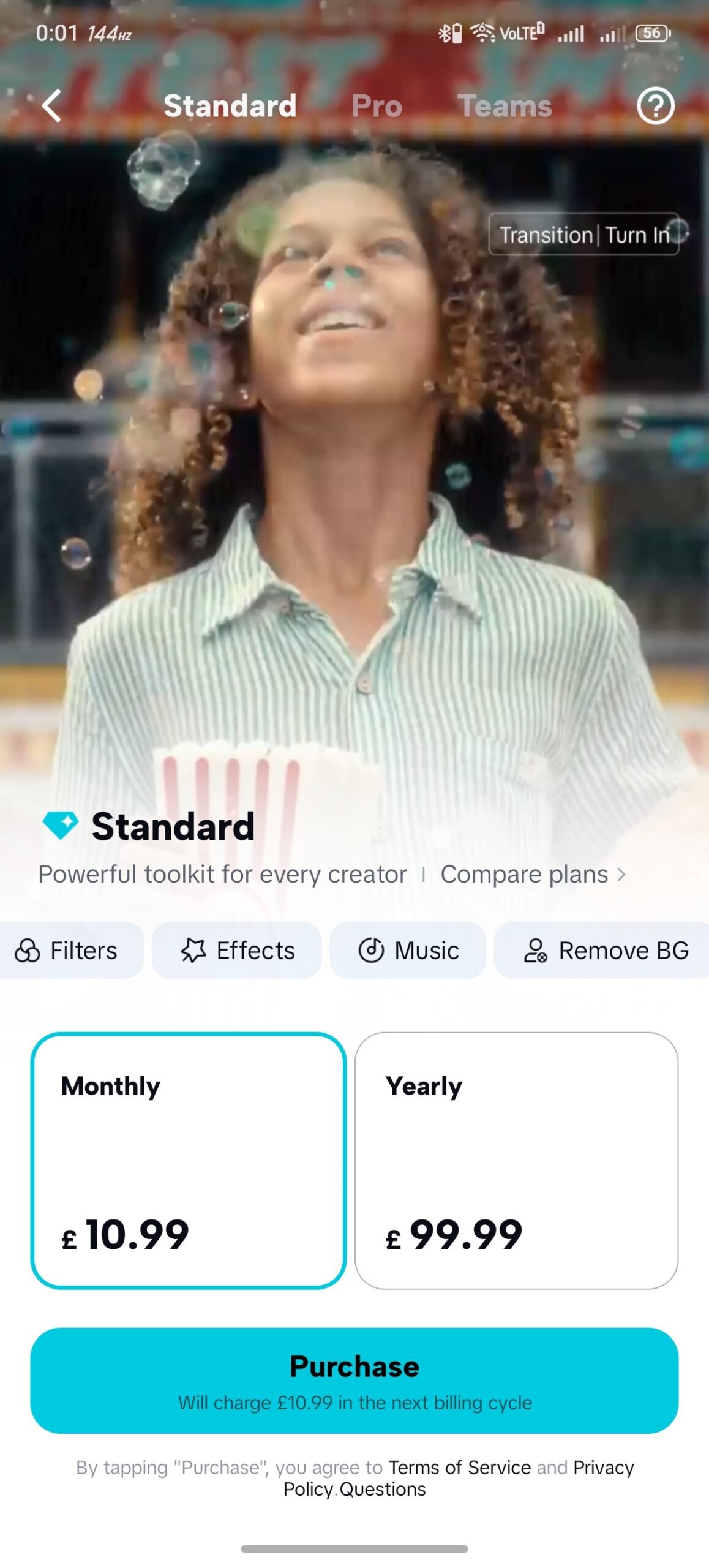
- CapCut Standard: £10.99/month or £99.99/year. Designed for everyday creators needing more tools.
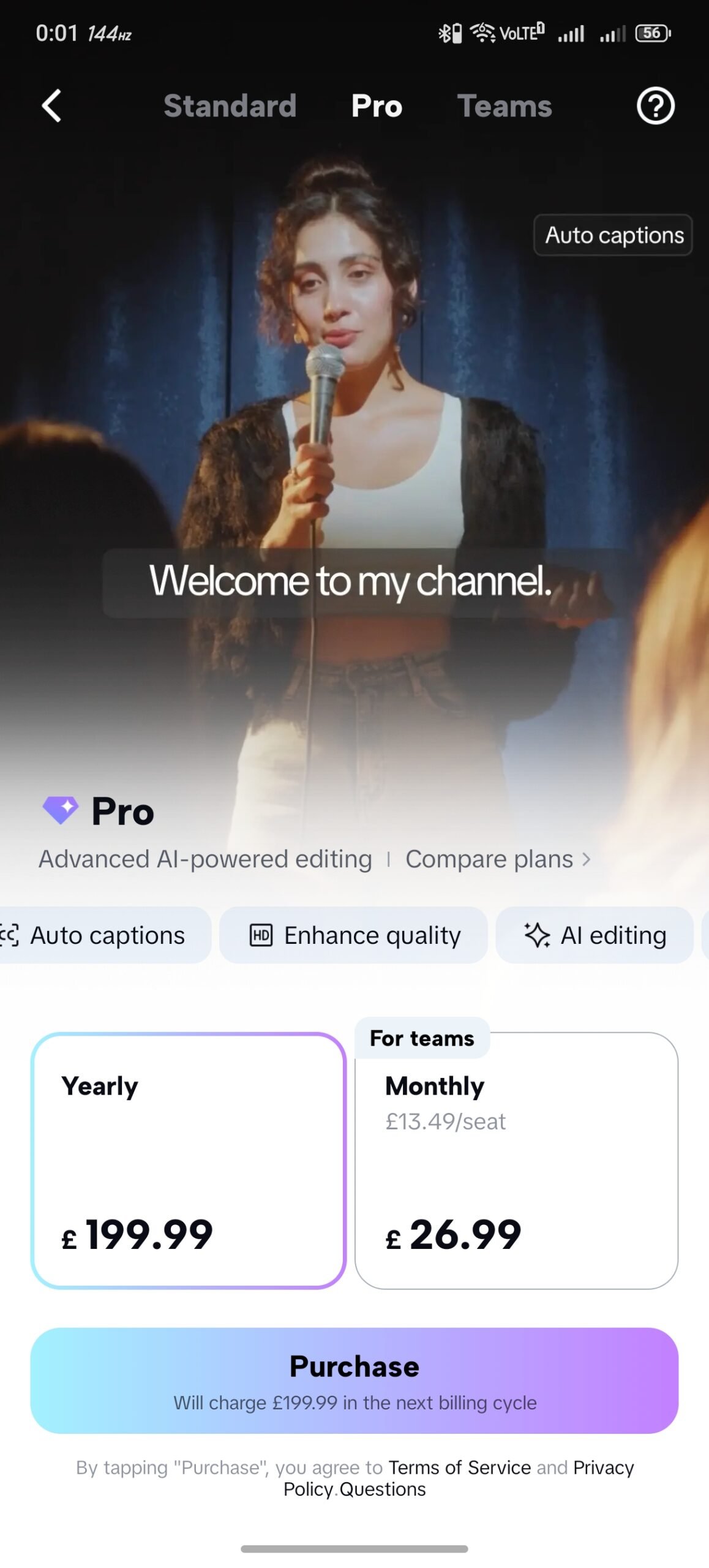
- CapCut Pro: £199.99/year. The ultimate package for power users, featuring advanced AI tools.
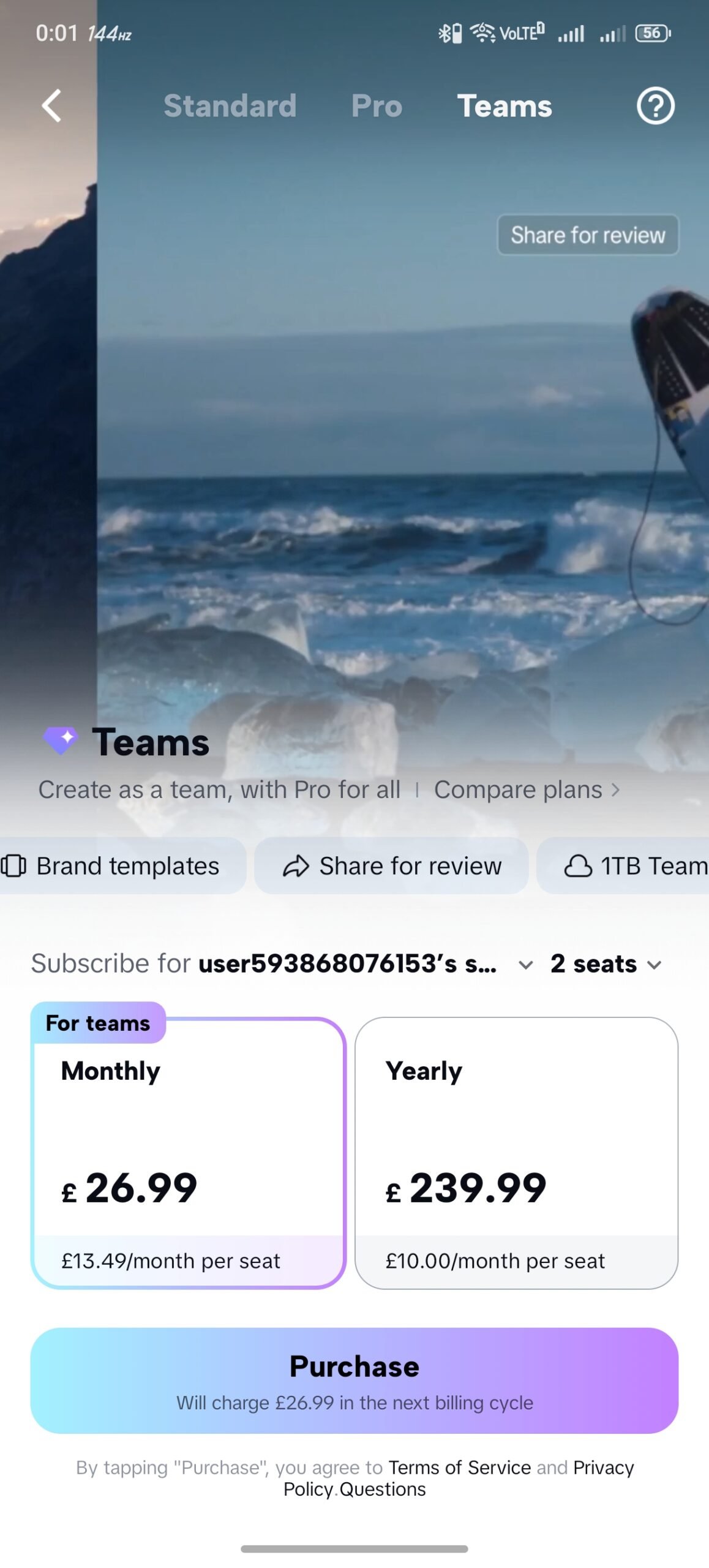
- CapCut Teams: £26.99/month or £239.99/year (Base 2-seat plan). Built for agencies and collaborative groups.
(Note: Pricing in this guide reflects the latest 2026 GBP (£) updates, but equivalent localized pricing applies globally in USD, EUR, and other local currencies).
Understanding how much does CapCut cost depends entirely on your workflow. Let’s break down each tier so you can make an informed decision without wasting your budget.
Is CapCut Free or Paid? The Freemium Model Explained
One of the most common questions from new users is simply: Is CapCut free or paid?
The short answer is both.
CapCut operates on a “freemium” model. This means that the core software is completely free to download, install, and use on iOS, Android, Mac, and Windows. You can cut clips, add basic transitions, and export your video without ever pulling out your credit card.
How Long is CapCut Free For?
Another frequent question is: How long is CapCut free for? CapCut Free is free forever. It is not a 7-day or 14-day trial that suddenly expires and locks you out of your projects. You can use the free version for years if you choose to.
However, the “catch” is that premium features—like advanced animations, high-end effects, and powerful AI tools—are locked. If you try to use a “Pro” feature on the free plan, CapCut will allow you to apply it to your timeline so you can see how it looks. But when you hit the “Export” button, you will be prompted to upgrade to a paid plan.
If you refuse to upgrade, you must remove the Pro feature from your timeline before the software allows you to export.
Deep Dive: The CapCut Free Plan
The free version of CapCut is arguably the most generous free video editor on the market today. It provides a massive amount of value for absolute beginners.
What You Get for Free
- Basic Editing: Cutting, splitting, resizing, and altering clip speeds.
- Standard Text: Basic text overlays and standard fonts.
- Basic Transitions: A solid library of simple wipes, fades, and slides.
- Chroma Key (Green Screen): The basic ability to remove solid color backgrounds.
- Exporting: Up to 4K resolution (though some advanced upscaling requires Pro).
Who Should Use the Free Plan?
The free plan is perfect for casual users. If you are just making a quick video of your dog for your family, or stitching together clips from a recent vacation, do not pay for a subscription. The free tools are more than sufficient.
However, if you are a social media manager, an aspiring influencer, or a business owner relying on video to generate revenue, the free plan will eventually bottleneck your creativity. That is when you need to look at the paid tiers.
How Much is CapCut Standard?
Introduced to bridge the gap between casual users and high-end professionals, the Standard plan is the first tier of the paid CapCut pricing structure.
CapCut Standard Pricing
- Monthly Subscription: £10.99 per month.
- Yearly Subscription: £99.99 per year.
What is Included in CapCut Standard?
The Standard plan unlocks a powerful toolkit for everyday creators. As the official interface states, it provides a “Powerful toolkit for every creator.” Key unlocks include:
- Premium Filters: Access to high-end color grading filters that make your footage look cinematic.
- Advanced Effects: Trending visual effects that dominate TikTok and Instagram Reels (like advanced blurs, light leaks, and dynamic zooms).
- Premium Music: Expanded access to CapCut’s massive, copyright-safe audio library.
- Remove BG (Background): A highly refined tool to strip backgrounds from subjects without needing a green screen.
Is CapCut Standard Worth It?
If you are asking How much is CapCut Standard worth to your daily workflow, consider how much time you spend searching for workarounds. If you spend hours trying to manually mask a background because you don’t have the “Remove BG” tool, paying £10.99 a month is a no-brainer. Time is money.
How Much is CapCut Pro? The Ultimate Powerhouse
This is where things get serious. CapCut Pro is the flagship offering, designed for users who want desktop-level editing power with cutting-edge artificial intelligence.
CapCut Pro Pricing
- Yearly Subscription: £199.99 per year.
- (Note: While yearly is heavily pushed, CapCut Pro 1 Month options exist in various regions, typically scaling higher than the standard monthly plan, usually around the £15-£20 mark. However, £199.99 is the standard anchor price for the full year in 2026).
The Pro Feature Set: Why It Costs What It Does
When you buy CapCut Pro, you aren’t just buying extra filters; you are buying an advanced AI editing suite.
1. Massive Cloud Storage & Credits
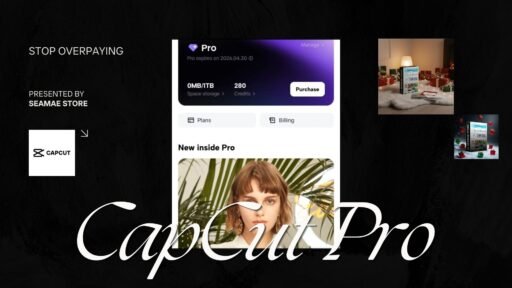
The Pro plan immediately gifts you 1TB of Space storage. If you edit across multiple devices (e.g., starting on your iPhone and finishing on your Mac), this cloud space is invaluable. Furthermore, you receive 1200 Credits, which are utilized for rendering heavy AI generations.
2. Auto Captions
In 2026, videos without captions simply do not perform. CapCut Pro’s auto-captioning feature is remarkably accurate. It listens to your audio, transcribes it instantly, and allows you to apply dynamic, animated text styles with a single click. This feature alone saves hours of manual typing.
3. Advanced AI-Powered Editing
Pro unlocks the “AI editing” suite. This includes features that can automatically trim silent pauses in your footage, reframe your subject to keep them centered, and generate b-roll based on your script.
4. Enhance Quality
Working with low-light or low-resolution footage? The Pro plan features an HD Enhance tool that uses AI to upscale and sharpen your video, turning unusable smartphone clips into crisp, professional-looking media.
5. Individual Instrument Separation
A groundbreaking audio feature in Pro allows you to isolate vocals, drums, or specific instruments from an audio track. This is phenomenal for creating custom remixes or cleaning up messy background audio in vlogs.
Who is CapCut Pro For?
CapCut Pro is explicitly built for YouTubers, professional TikTokers, freelance video editors, and digital marketing agencies. If video is a primary driver of your income, the CapCut Pro subscription is not an expense; it is a vital business investment.
What Is the Price of CapCut Teams?
Video creation is rarely a solo job anymore. Recognizing this, ByteDance introduced the Teams plan. What Is the Price of CapCut Teams? It scales based on how many “seats” (users) you need.
CapCut Teams Pricing (Base 2-Seat Plan)
- Monthly Subscription: £26.99 total (£13.49 per month, per seat).
- Yearly Subscription: £239.99 total (£10.00 per month, per seat).
The Collaborative Advantage
The CapCut Teams pricing is built entirely around workflow efficiency. When you upgrade to Teams, you receive “Pro for all,” meaning every member gets the Pro features, plus a suite of collaborative tools:
- Brand Templates: Create and lock specific fonts, colors, and logos. If you run an agency with multiple editors, this ensures every video exported matches your exact brand guidelines.
- Share for Review: No more exporting massive MP4 files, uploading them to Google Drive, and waiting for a client to email you timestamped notes. You can share a secure link directly from CapCut, and reviewers can leave frame-accurate comments right on the video.
- 1TB Team Cloud: A shared workspace where editors can access the same raw footage, graphics, and audio files without needing external hard drives.
Who is CapCut Teams For?
If you are a solo creator, do not buy this plan. However, if you are an agency owner with three editors, or a massive brand with an in-house content team, the Teams plan will streamline your entire operation and save you thousands in lost productivity.
Is CapCut a One-Time Payment?
A highly common search query is: Is CapCut a one-time payment?
No. CapCut is not a one-time payment. Like Adobe Premiere Pro, Final Cut Pro (recently), and most modern software, CapCut operates on a SaaS (Software as a Service) subscription model.
You cannot pay a single flat fee of $300 and own the software forever. Instead, you pay a recurring CapCut Subscription Price. This is why you see search terms like CapCut Pro 1 Year or CapCut Pro 2 Year. You are essentially renting access to their premium servers, cloud storage, and continuously updated AI models.
While subscription fatigue is real, the benefit of this model is that CapCut pushes out massive updates and new AI features almost every single month. You are always using the most cutting-edge version of the software.
Quick Comparison: Free vs. Standard vs. Pro vs. Teams
To make your decision easier, here is a rapid-fire breakdown of the CapCut Cost 2026 structure:
- CapCut Free ($0): Best for absolute beginners. Basic cuts, standard text, limited transitions.
- CapCut Standard (£99.99/yr): Best for casual creators. Unlocks premium filters, music, and background removal.
- CapCut Pro (£199.99/yr): Best for professionals. Unlocks 1TB storage, Auto-captions, AI enhancement, and instrument separation.
- CapCut Teams (£239.99/yr for 2 users): Best for businesses. Unlocks collaborative review links, brand templates, and shared cloud space.
How to Get CapCut Pro at a Massive Discount with SEAMAE
Let’s be completely honest: paying £199.99 (or roughly $250 USD) a year directly through the app store is a steep price for many independent creators.
You want the massive benefits of the 1TB storage, the Auto-captions, and the AI enhancement, but you want to protect your profit margins. This is where SEAMAE comes in.
SEAMAE (seamae.store) is a premium global e-commerce brand specializing in providing software users, creators, and professionals with a better way to buy their essential tools.
Instead of paying the full retail markup through the Apple App Store or Google Play Store, you can upgrade to CapCut Pro directly through SEAMAE and save a massive amount of money.
Why Buy Your CapCut License from SEAMAE?
1. 100% Genuine, Fully Licensed Keys
We do not sell shady workarounds, cracked software, or illegal APKs. When you buy from SEAMAE, you receive a 100% authentic, official license key. It registers directly to your official CapCut account, unlocking your features instantly.
2. The Cheapest Market Pricing
Because we operate globally and purchase licenses in massive bulk, we bypass localized app store taxes and markups. We pass those direct savings onto you. You will not find a legitimate CapCut Pro license for a lower price anywhere else on the internet.
3. Safe, Secure Checkout
We cater to a global audience of English-speaking professionals. Our payment gateways are encrypted, secure, and designed to protect your data with bank-level security.
4. Instant Digital Delivery
You don’t have to wait 24 hours for an email. The moment your secure checkout is complete, your genuine license key is delivered instantly to your screen and your inbox. You can copy the code, paste it into your CapCut app, and start utilizing Pro features in less than two minutes.
Stop overpaying for your creative tools. By purchasing through SEAMAE, you get the exact same premium software, the exact same cloud storage, and the exact same AI features—just at a fraction of the cost.
Frequently Asked Questions (FAQ) About CapCut Pricing
How much does CapCut cost per month?
If you choose to pay monthly rather than yearly, CapCut Standard costs £10.99 per month. The CapCut Teams plan starts at £26.99 per month for two users. CapCut Pro’s monthly cost varies slightly by region but generally falls between £15 to £20 per month when not bundled into the £199.99 yearly package.
Can I buy a CapCut Pro 2 Year subscription?
Officially, CapCut pushes the 1 Month and 1 Year subscription models within the app. However, by utilizing third-party global vendors like SEAMAE, you can often stack digital licenses or find extended duration keys that cover multiple years at a highly discounted rate.
Is CapCut Free safe to use?
Yes. CapCut is owned by ByteDance and is heavily regulated by global app stores. The free version is completely safe, though you should be aware of the data privacy policies standard to all major social media and editing applications.
What happens to my videos if I cancel my CapCut Pro subscription?
If you cancel your subscription, you will not lose the final MP4 videos you have already exported to your device. However, you will lose access to the 1TB cloud storage (meaning your project files may be deleted from the cloud), and you will no longer be able to export new projects that utilize Pro features on the timeline.
Can I upgrade from Standard to Pro later?
Absolutely. CapCut makes it very easy to ascend the pricing tiers. If you start with Standard and realize you need the Auto-captions and AI tools, you can easily upgrade your account and pay the pro-rated difference.
Conclusion: Make the Right Choice for Your Content
Understanding the CapCut Cost 2026 does not have to be complicated.
If you are just starting out, stay on the CapCut Free plan until you hit a creative wall. If you want a few extra aesthetic tools, the £99.99/year CapCut Standard plan is a solid stepping stone. If you are running a collaborative agency, the CapCut Teams plan will revolutionize your review process.
However, for the vast majority of serious creators, YouTubers, and digital marketers, CapCut Pro is the definitive answer. The sheer amount of time you will save using Auto-captions, AI audio separation, and 1TB of cloud storage will pay for the subscription within the first week of use.
Do not let retail app store prices hold your content back. You deserve access to the best tools on the market without draining your bank account.
Ready to unlock your full creative potential? Head over to SEAMAE today to grab your 100% genuine license, enjoy instant digital delivery, and buy CapCut Pro at the absolute cheapest price on the global market. Stop waiting and start creating!